Assembly
The same photos, backwards. The last thing you took off is the first thing that goes back, and you tick each circle as its screw goes in.
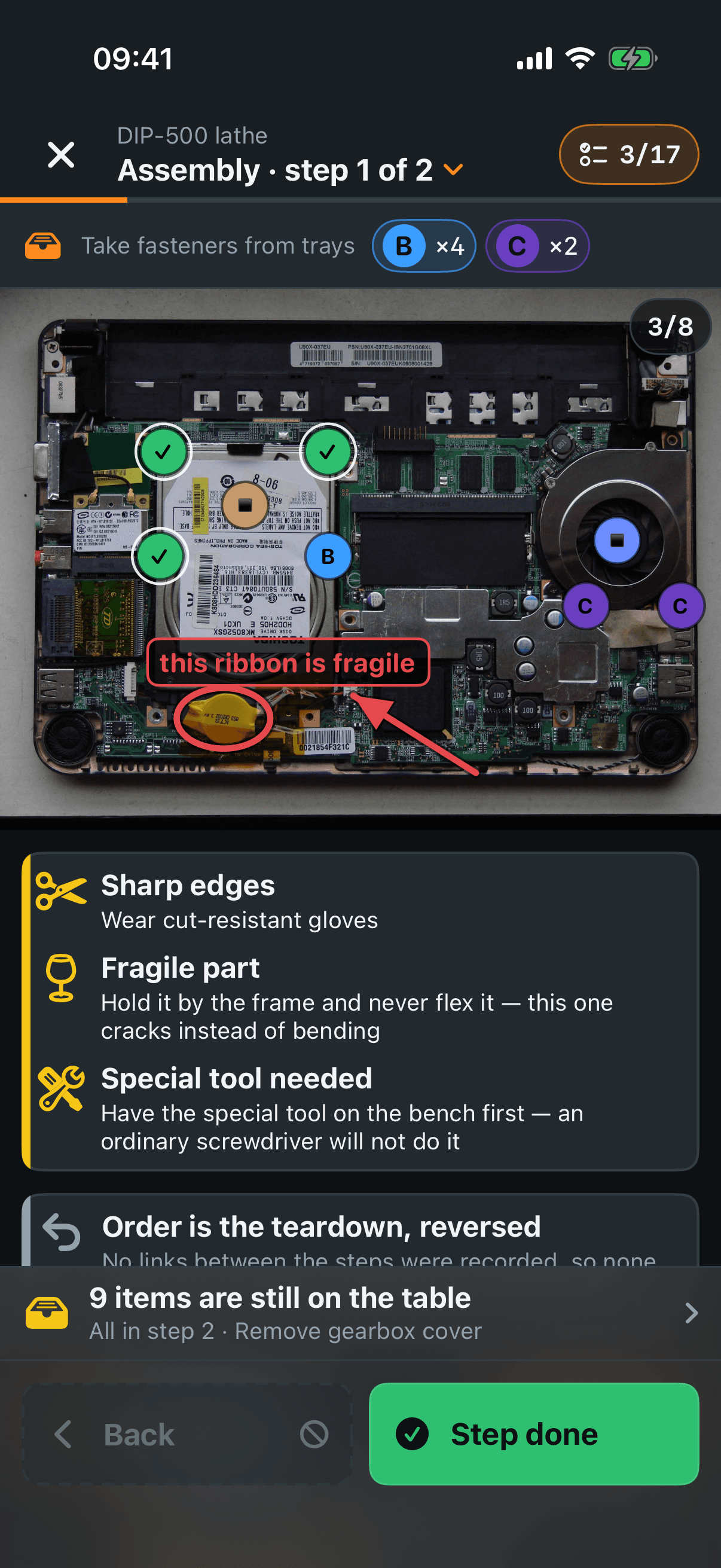
The counter, top right — how many items are back in out of how many there are. It counts things you hold in your hand — bolts and removed parts — not circles on photos, so a pile logged as eight bolts with no marks still counts eight.
Assembly · step 1 of 2 — tap it for the list of steps in assembly order.
Take fasteners from trays — the cups this step needs, with the letter and how many out of each. This is the row you read before you reach for anything.
Tap a circle — that fastener is back in; it turns green and gets a tick. Tap it again to take it back. Marks cannot be dragged here: where things sat was settled during the teardown.
Hazards — first on the list, above everything else, because below it you are already reaching for the machine. Each one names the danger and what to do about it.
Order is the teardown, reversed — says where this order came from, and admits when nothing linked the steps together so the order is simply the list turned round.
Voice note and step clip — playback only, no recording and no bin. This is the minute they were made for: “unclip the left catch first”, said three days ago over the open machine. The clip also plays at half and quarter speed.
Note cards — the words and recordings left on the photo you are looking at, to read and to listen to.
Fasteners to fit — one row per cup: what it is, how many are back in. Mark all ticks the whole cup off at once and Clear puts it back. Under a row sit the photos of that pile, so you can see which is which.
Parts to put back — the same for parts, each with its own photos.
The bottom panel
N items are still on the table — tap it for the whole list of what is not back in yet and which step each belongs to. Tap a line to jump straight to that step.
Back / Step done — move through the steps. On the last one it says Finish.
Leaving with things still out — the app asks rather than argues, and offers three answers: Show me where, Finish anyway and Cancel.