Projects
Every teardown on this iPhone. This is the first screen and the only one you can reach without a project.
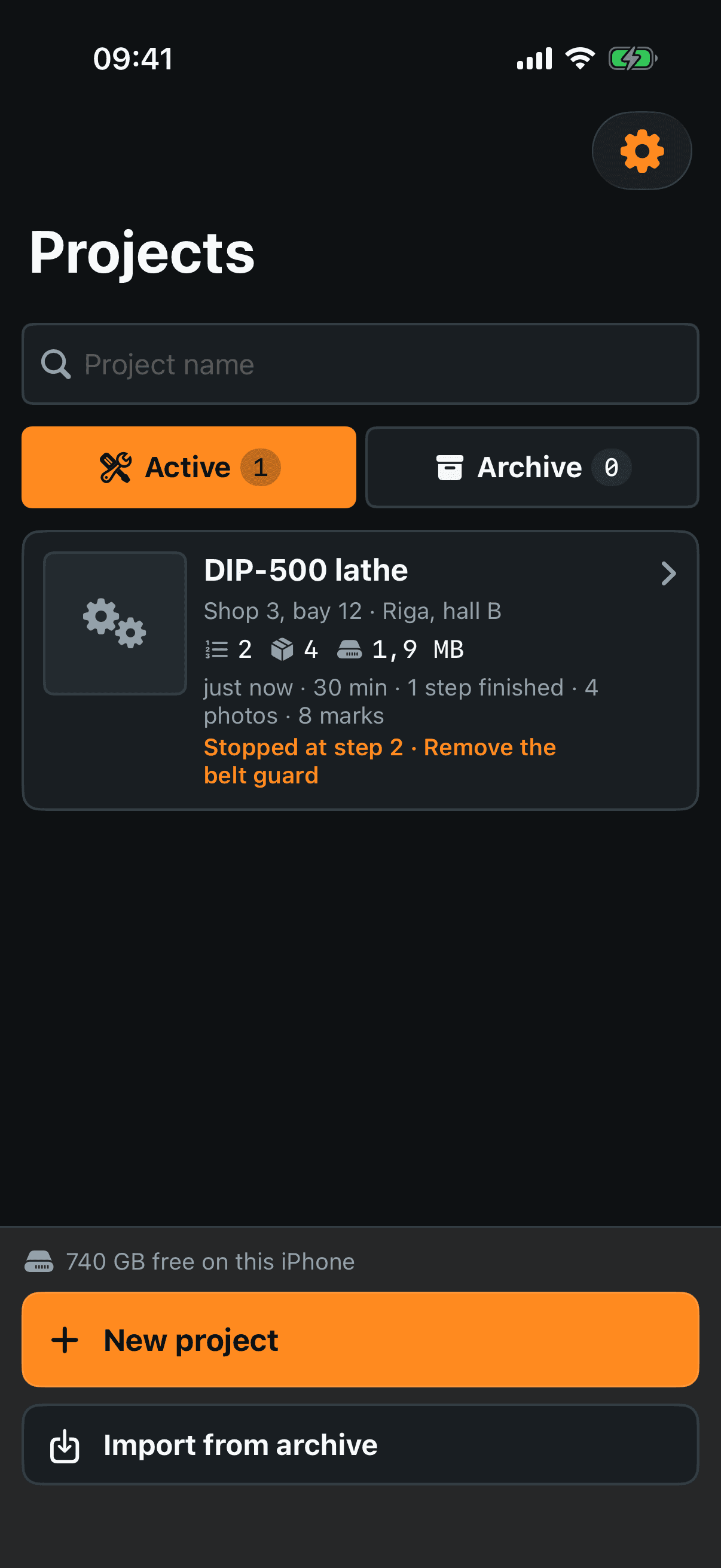
Project name — the search field. Type and the grid narrows as you go; the cross clears it.
Active / Archive — two tabs with counts. Archiving takes a finished job off the front page without deleting a thing.
The card — tap it to open the project. It shows the name, where the machine came from and where it goes, how many steps and parts are logged, what it weighs on disk, when you last touched it and, in orange, the step you stopped on.
Settings — the gear at the top right. Section 9.
What a card can do
Swipe the card to the left, or hold your finger on it. Four actions are in the swipe strip; holding shows all five.
Rename — changes the name and nothing else. Photos, steps and marks are not touched.
Duplicate — for a second machine of the same model. The plan comes across: steps, parts, trays and their letters; the evidence — photos, marks, drawings, voice notes — stays with the original. The sheet says exactly that, with numbers, before you press Make the copy. It is in the hold menu only: the swipe strip has room for four buttons at a size you can hit.
Archive / Unarchive — moves the card between the two tabs.
Export — the export screen for that project, without opening the project first. Section 8.
Delete — lists what will go, counted, before it goes. This one cannot be undone.
The bottom panel
Free space — how much room is left on the iPhone. It turns into a warning when the room is short.
New project — asks for a name, which you can leave empty, and opens the new project straight away.
Import from archive — reads a .zip archive or a lone project.json back in. It always makes a new project and never merges or overwrites, so importing yesterday's archive cannot cost you today's work; when it is done it reports what arrived, counted. The button is on the empty list too — a new phone with an archive on it is exactly the case it was written for.